- 如何將CKEditor整合到ASP.NET的網站中使用,並在官方只提供3.6.6.2版支援ASP.NET情況下,使用最新版的CKEditor功能
- 修改CKEditor 的 Configuration 說明
2017年9月8日 星期五
為了將CKEditor 使用在公司的問題管理系統中 我用到或者可能用到的相關資源


處理瀏覽器上針對文字編輯方塊中 影像資料的 剪下貼上與上傳 How to paste image to text editor and upload to server on browser?
這個問題是,如何用剪下貼上的方式將影像資料貼到瀏覽器的文字方塊中,並將其傳送到Server端儲存?
How does the paste image from clipboard functionality work in Gmail and Google Chrome 12+?
Cut and Paste image in html editor and send image data to server side for saving as gif or png file
How does the paste image from clipboard functionality work in Gmail and Google Chrome 12+?
Cut and Paste image in html editor and send image data to server side for saving as gif or png file
2017年9月7日 星期四
如何讓外部網路可以存取到內部網路? How to expose a local server behind a NAT or firewall to the internet?
因為各種目的我們需要開放內部的服務給外部使用,通常會使用VPN的方式,或者透過NAT內設定Virtual Server的模式轉送封包,或者是DMZ。
以下列出一些方式與資源分享,供自己未來的查詢方便。
I want to expose a local server behind a NAT or firewall to the internet. <- div="" norok="">
免費VPN Server/Client
2017年9月6日 星期三
2017年9月1日 星期五
2017年8月21日 星期一
如何設定Windows防火牆規則,讓SQL Server只被指定存取的IP range存取,以減少被入侵的風險。
預備事項
確定SQL Server本體使用的Port(通訊埠)
確定要存取的外部IP網段 (ex: 140.26.136.1~140.25.136.254)
打開windows防火牆 (控制台->系統與安全 or 網路與分享中心的左下角)
點選左側的進階設定(下圖為英文版畫面)

點選左側輸入規則->新增規則


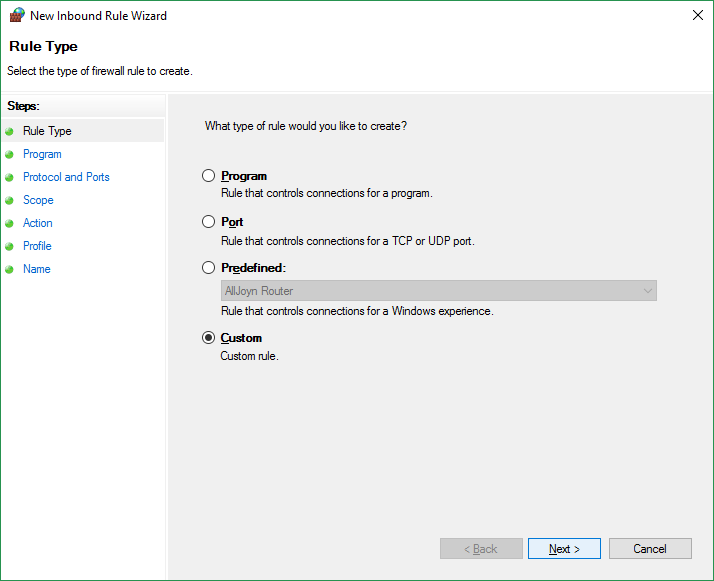
選擇自訂規則
選擇所有程式(如果只要限定使用sql server則需選擇sql server主程式)

選擇通訊協定類型TCP,指定通訊埠 1433

設定遠端IP位址為遠端需存取本地端SQL server的IP 區段,新增時依需要設定單一IP或子網路。或者設定IP位址範圍(如下圖)

依需要選擇允許連線或者封鎖連線

- 設定規則要使用在哪個網路環境下,當電腦連到網域,私人網路或公眾網路。

將此規則命名並描述其內容

設定完成
訂閱:
文章 (Atom)